Thursday, June 12, 2025

Debugging VCO Pitch unstability continued 2

Testing continues. First up:

Disconnecting all waveshaper outputs:

Disconnecting pulse, saw, saw inv, sine, triangle, sub square 1 and 2, sub saw 1 and 2. No difference in noise

Replacing trimmers with resistors (to disconnect trimmer wires, as trimmers are on the mainboard):


No difference. At this point, the wires still connected are +12V/GND/-12V, -5V, In center, symmetry, DCO in, PW CV and Pulse VCA CV.

Stopping the sub oscillator

First, trying to stop the sub oscillator by pulling pin 7 of IC8 to GND


That didn't work at all! Instead, the noise quadrupled, probably because the output of the op amp pollutes GND.

Next, by pulling pin 8 of IC8 to GND

Not really any big change there.

While still pulling pin 8 to GND, reducing PW to 0

This DOES have some effect, though we still see spikes for each period. Not sure where they're from

Combining stopped sub oscillator and pw at max

At this point both the sub oscillator and pulse wave outputs are stopped. There still is noise, but less. The spikes are gone, not sure why.

The comparator op amps (IC8B, IC1D) are still running, this is probably where the noise is coming from.

I did also try to reduce the amplitude of the DCO by running it trough a buffered 33k/100k resistor divivder. That way, I could make sure the PW would be completely disabled. Not a big change there either.

Tapping ground directly from power input, not via mainboard. Sub osc and pulse waves are running


This is interesting. The noise is halved. It should be quite apparent by now that this is most likely caused by noise on the GND line. Let's reconnect the full waveshaper board but without GND

With waveshaper board A fully connected but GND routed back to power input:

This is good, the noise isn't increased by reconnecting all pins

With waveshaper board A and B fully connected but GND routed back to power input:

Maybe a bit surprising, but the noise level doesn't change when reintroducing waveshaper B, as long as the GND goes back to the power input. This is very nice.

Double check how things normally are - reconnect GND back to mainboard


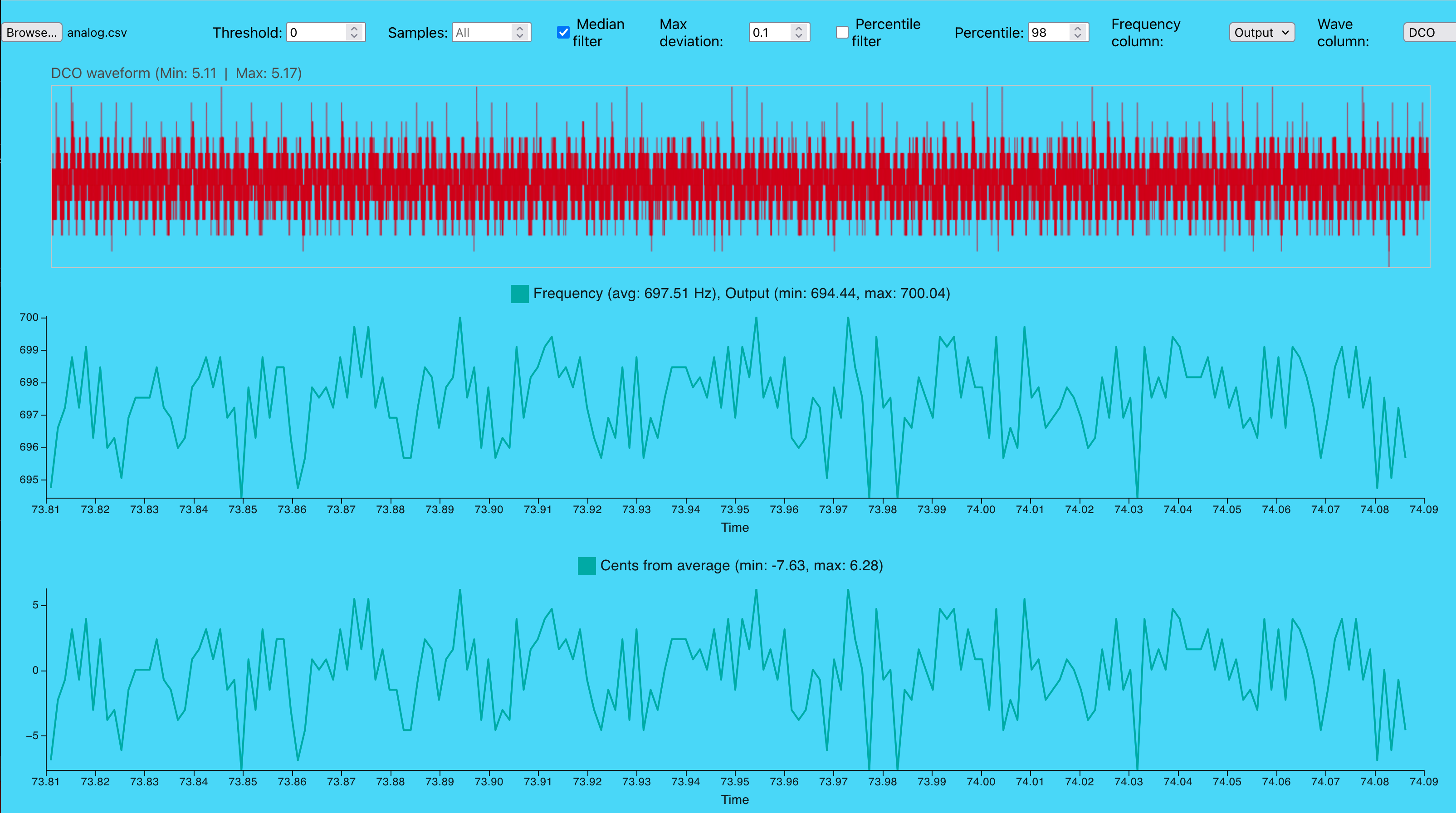
Sooo, the noise is back up past 10 cents, approximately +5 cents on both sides. In my first measurements the noise was around +/-20 cents, but then the VCO was running at 7k. Here it runs at 15k. Also, at some point I started synching DCO 1 and 2. Still, a bit confusing.

Plugging waveshaper straight into the main board with VCAs in place. Moving VCO off board

Again, noise is much lower, but this time the noise is back to being sort of a triangle shape. I THINK i still kept hard sync on, so this is a bit confusing. The period is still 333Hz, same as the DCO

Increasing the sample rate and VCO frequency for a better view:

The shape stays the same. Weirdly enough, the plot of the DCO is missing the bottom half, what is going on?

Part 3 wrapped up

I am still not able to completely figure out if the noise is caused by the op amp creating the clock pulse for the waveshaper, the pulse wave generator or the flip flop for the sub oscillator, though the last one seems a bit more unlikely as the noise follows the pulse, not the sub oscillator

Disconnecting all outputs from the waveshaper didn't make a great deal of change, whereas moving the GND did. I can only assume this means that the noise, at least partially, travels through the ground plane. On a side node, version 2.2 of the waveshaper used the LM311 in the sub oscillator circuit. This generated a lot of noise that affected the VCO (perhaps not from the LM311 itself but from the spike generation circuit after it? who knows. From my (unpublished) 'Testing the voice card' post:


If the noise is in the ground plane, it affects more than the VCO - VCA levels, filter FM and cutoff etc. But noise on these are probably less audible.


More to test (hey, we're up for a post number 4!)

- x Set pw to 25% and see how the noise reacts. At this point the sub oscillator should still have pw 50% so we may be able to see a difference? 

- x Connect both VCO and Waveshaper grounds to power gnd, effectively making it star ground

- x Try to measure noise on the ground plane

- Look for info on how op amp comparators may pollute the ground plane.

- Breadboard the offending parts of the waveshaper (pulse and clock generators) to see if we get the same result

- x Remove the mixer PCB and tap VCO directly

- x Enable DCO output in mixer but measure VCO at its output, is the noise even worse? 

- x Measure noise on CV 

- x Measure noise on CV without measuring SPI with same probe. 

- x Measure noise on CV relative to GND on VCO! Move GND back to Voice card 

- x Ground CV/Connect to voltage from modular synth 

- x Disconnect Lin FM input from VCO


Wednesday, June 11, 2025

Debugging VCO Pitch unstability continued

With PW set to zero

This mostly removes the noise. Not completely, but quite a lot better

With triangle DCO

The frequency seems to vary with the triangle wave as well
 
But when increasing the resolution and VCO frequency, we see that it is not a complete triangle, it seems to drop abruptly at the top of each DCO cycle.

Square wave is rounded


An observation - the frequency square wave is rounded, almost like it is low pass filtered.

Removing waveform mixer VCA

The square wave has its VCA on the waveshaper board so it is still visible  

Setting DCO to triangle, waveform mixer VCA is still removed

The triangle wave now never reaches the waveform mixer, but the square wave still breaks through. The frequency variations are almost exactly the same as what we saw when the triangle wave WAS connected, see "with triangle DCO, high resolution" above. Perhaps the triangle does in fact NOT affect the CVO.

Setting DCO to square, PW to 0. Waveform mixer VCA is still removed


There is still a small variation, but it is less than we saw before. However, there IS a slight up and down squarish effect here. Could it be coming from the input to the sub oscillator flip flop?

Also, there are significant spikes at the period marks. It could be that a PW of 0 is not quite turned off OR it could be from the sub oscillator circuit.

Moving waveshaper off board with jumper cables

The noise is the same as previously, distance doesn't matter

 Single DCO set to triangle

Square still breaks through

Pulse output from waveshaper board disconnected 

This is very interesting, almost not understandable. The pulse output is disconnected so the pulse wave does not reach the mainboard. But still we see the frequency noise! We also see the clicks on DCO period start.

Disconnecting the DCO input

Disconnecting the DCO from the waveshaper makes everyhing go away. Not surprising but a nice check. 

Recap

So, what we see this time is that 

- The noise is most likely only caused by the pulse wave (?), or at least not as much by triangle etc.
- The noise is present even when the pulse wave is disconnected from the mainboard
- There are heavy spikes at the start of each cycle

Theories

- The noise may originate from two sources: The saw-to-clock-pulse converter around  IC6 (LM311), and the pulse wave generator around IC1
- The noise does not travel (exclusively at least) through the pulse pin. 

Next up

- Disconnecting other waveform pins
- Disconnecting sub oscillator pins
- Disconnecting trimmer pots, replace with resistors
- Stopping the sub oscillator, with and without pw at 0
- Halving the DCO input to completely stop PW output
- Moving GND pin for the waveshaper to not return to the mainboard
- Check if flipflop stops
- Reconnect everything and move GND only.
- Move VCO offboard and do stuff suggested in the previous post. 

Tuesday, June 10, 2025

Debugging VCO Pitch unstability

After making the frequency analyzer script, I've started a thorough checking of the VCO frequency. It's very clear that something is not quite right, something is modulating the CV (e.g. some kind of noise on the pitch CV input, or perhaps ground).

I initially thought that the linear and exponential FM inputs could be the culprits, so I removed IC9. Here is what that looked like:

The frequency very clearly oscillates around 653Hz. However, don't get fooled by the sinusoid or triangle looking shape - the frequency variations are bipolar, they go in both positive and negative direction. If the noise was indeed a single sine wave, it would not bounce up and down. (Now, this may actually be wrong, see later in the post).

That probably means that we're dealing with more than one noise source, that sometimes cancel out and sometimes doesn't. Almost looks like two oscillators slightly detuned, right? 

Increasing the VCO frequency gives us a better view of what is going on:

With a 7.3kHz wave we get a better approximation of the noise. We get several samples at the same frequency (the small peaks are probably due to the sample rate in logic2 being too low), then it drops and stays low for some time, before going up again. It doesn't take too much imagination to see that the noise may be a square wave of some sort.

If one looks closer at the timeline, the pulses appear to be around 0.003s apart, meaning the noise has a frequency of around 333Hz. 

Now, where on the board can we find two square wave sources, slightly detuned? I got a feeling, let's have a look at the output of the DCOs!


 Oh yeah! The DCO is currently running at 330Hz! 

Lets double check. What happens if we halve the DCO frequency?


Ok, the issue isn't as pronounced now, it's dropped from +/-20cents to +/-10 cents - but the period has changed to 0.006s, the noise frequency is now 167Hz. I think it's pretty clear that this it DCO related.
 

Chasing the source

Clearly, the source is related to the DCOs, but what exactly? Is it 
- the DCOs themselves
- the sub oscillator circuit (that made audible noise in the previous waveshaper version!)
- the square wave generator
- the output from the waveshaper 
- the output from the waveform mixer

Here are some things I've tried:

Changing the waveform of the DCOs from square to saw:

There is still considerable noise, but the square wave pattern is gone. 

Disconnecting the waveshaper PCB: 

Now the noise is nearly gone! most fluctuations is reduced from 20 to 2 cents, which is probably an acceptable level. Also, putting back the IC9 FM source switch didn't change anything, which is hardly surprising since the FM sources are gone...

Reintroducing the waveshaper, but removing the DCO inputs:

Still looking good. Again, not surprising but at least it tells us that the waveshaper board by itself doesn't cause the noise.

Reintroducing the DCO inputs, one at the time:


DCO A

DCO B

Now, these confuse me. With a single DCO we still get a sine-like behaviour. Looking at DCO A, the VCO frequency (662Hz) is very close to twice the DCO frequency (330Hz), so two and two cycles are probably getting modulated by each top/bottom of the DCO wave, and as the frequencies are not exactly the same, the time at top/bottom moves around, creating the sine/triangle effect?

The DCO B plot is completely bonkers, bot sure what is going on there. The difference in cents is still 10 though. 


More to test

- Remove the waveform mixer. If the noise is coming from the waveshaper itself it shouldn't matter (though, as changing the DCO waveform DID matter, I suspect that this doesn't change anything).

- Short the suboscillator flip flop input to ground to stop it. Will tell us if the sub oscillator is the source. NB: Test with a single waveshaper.

- Change the pulse width of the DCO pulse wave, if possible disabling the pulse wave altogether. This is also best tested with a single waveshaper, just disconnect the second DCO input. NB: Test with different waveforms selected, not just pulse. 


Now, after these tests we should have a fairly clear view of what the noise source is. Next up is figuring out how the noise enters the VCO. A few things to try:

- Move the VCO off board and connect the pitch input to ground close to the PSU

- Move the VCO off board and connect the ground input to ground close to the PSU  

- Try to measure GND and pitch CV at the VCO input relative to GND at the PSU 


A note on noise amplitude

The frequency analyzer predicts the noise amplitude using the ratio cents to volts. In a 1V/octave, 1V corresponds to 1200 cents. The change is linear (well, if the VCO tracking is tuned properly), so 20 cents means 16.7mV.  

The VCO circuit is currently 1V/oct if using a 100k resistor at the input. This is true for the exponential FM input, but for the pitch CV we're using a 39k input. In this case, 1V is 2.56 octaves or approximately 3000 cents. 20 cents will then be as little as 6.7mV!

On the other hand, if the noise is coming through the ground plane, who knows what the amplitude will be. 

Sunday, June 8, 2025

Frequency analyzer

To get a better feel of the stability of the VCO I wrote a small program that analyzes the export from logic 2 and measures the frequency everytime we get a positive zero crossing.

 As not to spoil the fun, here is the DCO:


 The DCO is fairly stable, with a deviation of around 0.5Hz for most cycles when running at 880Hz, or 0.06%.

Now, as for the VCO...


Here we get a frequency variation of around 50Hz when running at 2920Hz, or 1.7%, almost 30 times worse than the DCO. This definitely has to be inspected more closely.

Tuesday, May 20, 2025

Thoughts on VCO CV resolution

In the current version of the XM8 voice controller, the 5V CV is meant to span 13 octaves for the VCO. I am however starting to worry that the span is too large / the CV not precise enough for this to work, so here are some possible solutions to improve that, followed by some calculations about precision that may or may not make sense!

Now, most VCOs have a  1V/oct response, and we have a 5V CV range. This means that the normal configuration gives us 5 octaves (without any tuning, that is)

Update: The Prophet 5, from which I've stolen my VCO design, uses 10V CV. More on this at the end.

What can we do about the range?

We can introduce a second CV to select octave range. Lots of synths transpose the VCO up/down this way. If we use a second 1V/Oct input, we can get 5 more octaves (just not at the same time).

We can even build a circuit that is easily modified between 13 and 5 octaves like this:

a 100k and 56k in parallel gives around 36k ohm, which in turn gives us around 13 oct of range. Cutting JP5 makes the input 100k or 5 octaves.


Now, this will improve the resolution of the CV. It will also make the CV less susceptible to noice (by a factor of 2.5). But from my measurements, some of the noise is even present in the CV itself. And adding two CVs with the same noise will double it, and the improvement is only a factor of 1.25. 

Can the noise issue be improved?

Here is a possible solution: Invert the second CV (and shift it upwards by 5V). Everything is computer controlled, so re-inverting in software is no problem. Summing these CVs will cancel any common noise. Of course, if the noise is present in the summer or shifting voltage as well this won't help, but I suspect that the noise I've seen originates from the SPI signal controlling the CV DAC. 


Now for some calculations

With a 16bit dac, the theoretical number of discrete steps is 65536. When controlling 13 octaves, a semitone is 65536 / (12*13) = 420, meaning a minimum interval of 0.24 cents. But one step is also 5V / 65536 = 0.076mV, which is extremely small! Any noise will greatly affect the CV. For example, a noise peak of 1mV equals 13 steps or 3 cents. This is around the limit of what the human ear can discern.

One is often saying that a more realistic resolution is 14bit, in which case one step is 0.3mV. Now the max resolution is 16385 / (12 * 13)=105, or about one cent. Still ok, but close to what the human ear may hear.

So what happens if we reduce the VCO range to 5 octaves?

A normal VCO has a 1V/oct input. In this case, 5V spans 60 semitones or 6000 cents. In other words, one cent is 0.83mV. A 1mV error means a 1.2 cent pitch error, or 2.5 times better (which should hardly be a surprise as 13/5 = 2.6). As for tuning, a 14 bit dac will get 16384/60=273 steps per semitone or 2.73 steps per cent. Again, 2.5 times improvement over the 13 octave case.

All in all, using a 5V span lets us use a 13bit effective resolution and still get around 1 cent resolution. It is also less sensitive to noise - at the cost of only being able to span 5 octaves instead of 13. It also means that I have no way of offsetting or correcting for linearity errors, which may make this a bad idea. I could use the second CV for offset, but then I would also reduce the number of octaves available.


Update: The Prophet 5

So, after posting, I had a closer look at the original circuit diagram for the Prophet 5. On electric druid, there's a comment about the P5 not using the HF tracking input, but instead probably doing corrections through the digitally controlled CV.

But that had me thinking - if the CV is 0-5V, there's no room for tuning. Turns out, the P5 CV is not 5V, it is 0-10V directly from the DAC, leaving plenty of room for tuning etc! It uses a 16bit DAC, though the two lowest bits are left out as it is only 14bit monotonic.

A 10V output from the DAC means that we have twice the range of a 5V CV, but without a higher noise level. E.g, 100mV noise on the 5V CV with a 5 oct range is the same as 100mV noise on 10CV with 1= oct range. The steps-per-cent is the same. 

My case is actually even worse. I have a 2.5V DAC which is then amplified to 5V. Any noise present at the DAC amplifier will be doubled. So, instead of having a 10V CV span 10 octaves, I'm trying to make 2.5V span 13. 

So, depending on where noise is actually introduced, I have a possible CV noise level  5.2 times higher than the Prophet 5. Damn.


Sunday, May 18, 2025

Distortion v1.2

I forgot to add the output gain op amp to my distortion circuit, so the output was 1/11th of what it was supposed to be. Here is a corrected version:


In the previous version, I buffered the output from the resistor voltage divider. This is not necessary as it is fed straight to the positive input of the distortion op amp, so I could use that op amp for output gain instead.

At 5V CV the output is unity gain, whereas it distorts at 0V.

A +/-5V signal passes undistorted through when cv is 5V. A +/-10V signal distorts slightly. The output never reaches higher than +/-9V so no clipping.

With CV = 5V and input 10Vpp, output is 10Vpp undistorted

 
With CV = 0V and input 10Vpp, output is a nice distorted signal at around 14Vpp


With CV = 5V and input 20Vpp, we get a bit of distortion, output is around 16Vpp

Finally, With CV=0V and input 20Vpp, we get heavy distortion, but the output is still not more than 18Vpp